7 Common Structured Cabling Mistakes NYC Contractors and Tenants Should Avoid
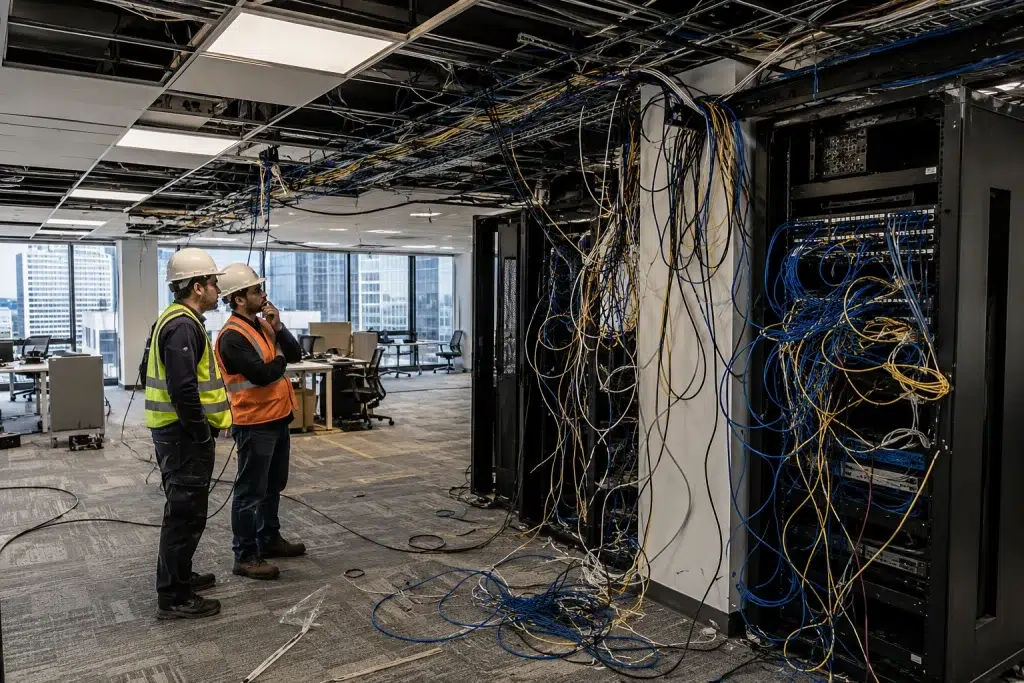
Structured cabling mistakes are the hidden cost behind most NYC office network problems. We’ve walked into commercial spaces in Midtown, the Financial District, and Long Island City where the hardware was solid — UniFi switches, properly spec’d APs, decent firewalls — but the network performed poorly. Every time, the cabling told the story. Unlabeled drops, mixed cable categories, zip ties cinched so tight they crushed the pairs inside. Problems that didn’t show up on day one but degraded the installation over months.
This post covers the seven structured cabling mistakes we see most often in NYC office deployments. Each one has a clear cause, a real cost, and a straightforward fix. If you’re planning a new build-out, inheriting an existing installation, or evaluating a contractor’s quote, this is what to watch for.
Why Structured Cabling Mistakes Are So Common in NYC
New York City commercial construction moves fast. Tenant improvements have tight timelines. General contractors push subcontractors to finish ahead of schedule. Low voltage installers work under pressure to pull cable, terminate, and get out before the next trade moves in. That environment produces shortcuts.
The Gap Between Low Voltage and IT Expectations
Most structured cabling work in NYC falls under low voltage electrical contractors — not IT professionals. A low voltage crew knows how to pull cable correctly. They don’t always understand how those cables perform at 10 gigabits. They may not know the difference between a passing wire map result and a passing certification result. That gap between physical installation and network performance is where most mistakes live.
The tenant usually discovers the problem after move-in. By then, the ceiling tiles are in, the contractor is on another job, and fixing anything costs three times what proper installation would have cost in the first place. For a broader look at why professional cabling matters long-term, see our guide on the key benefits of structured cabling for business infrastructure.
What These Structured Cabling Mistakes Actually Cost
Re-opening a ceiling in a commercial NYC building runs $150 to $400 per drop location. A full re-pull on a 50-drop installation can exceed $15,000. That’s before you account for the IT downtime, the furniture moves, and the construction dust cleanup. The seven mistakes below each carry that kind of remediation cost if you catch them after move-in.
Mistake 1: Skipping Cable Certification Testing
What happens: The installer runs a wire map tester, marks every run as passing, and hands over a one-page wiring diagram as the “test report.”
Why it’s a structured cabling mistake: A wire map confirms the cable connects end-to-end. It doesn’t test insertion loss, NEXT, return loss, or propagation delay. A run can pass a wire map test and still fail at 10-gigabit speeds. You won’t know until users start experiencing drops and slow connections — often months after installation.
The fix: Require full Fluke DSX cable testing to TIA-568 standards before the project closes. Every run gets a per-run pass or fail result with measured values. Put it in the contract scope before work starts. If the installer can’t provide a DSX report, they didn’t certify the cable. For a full breakdown of what certification covers, see our guide on Fluke cable testing for network certification.
Mistake 2: Mixing Cable Categories in the Same Run
What happens: A technician uses a short piece of Cat6 to extend a Cat6A run or to patch a distance gap in a conduit. The overall run tests at Cat6 — not Cat6A.
Why it’s a structured cabling mistake: A cable channel performs at the lowest-rated component in the path. If 90 meters of Cat6A connects to 5 meters of Cat6, the entire run certifies as Cat6. That means a 1-gigabit maximum, not the 10-gigabit performance your switch and APs need. This happens most often when a crew runs out of Cat6A mid-job and uses leftover Cat6 to finish a few drops.
The fix: Confirm the cable category for every run on the material list before installation starts. Cat6A has a distinctive larger outer diameter — you can identify it by hand. Any run that mixes categories needs a full re-pull of the shorter segment. See our detailed comparison of Cat6 vs Cat6A vs Cat7 and when each category applies.
Mistake 3: Installing Unlabeled or Mislabeled Cable Drops
What happens: Cables arrive at the patch panel without labels — or with labels that don’t match the outlet at the other end. The as-built documentation either doesn’t exist or doesn’t match what’s actually installed.
Why it’s a structured cabling mistake: Unlabeled infrastructure turns every future change into a troubleshooting exercise. Moving a workstation, adding a VLAN, or replacing a failed port requires tracing cables by hand — which means pulling multiple connections to find the right one. In a 50-port patch panel with no labels, a 10-minute task becomes a two-hour problem.
The fix: Every port on the patch panel and every outlet on the wall gets a label matching the cable schedule. Use a Brady BMP21-PLUS or similar label printer. Handwritten tape fades and peels within 18 months in a warm closet. The cable schedule becomes the as-built document — and that document gets handed to the client at project close. Our guide on structured cabling ROI over 15 years explains why documentation pays off long after installation day.
Mistake 4: Violating Bend Radius and Cable Fill Limits
What happens: Cables make sharp 90-degree bends around conduit corners. Multiple cables bundle tightly in a tray. Someone cinches a zip tie too hard across a group of Cat6A runs above the ceiling.
Why it’s a structured cabling mistake: Cat6A has a minimum bend radius of four times the cable diameter — roughly 40mm. Bending tighter than that crushes the pair geometry and raises crosstalk. Zip ties applied with a tie-gun tool generate enough force to deform the cable jacket. The damage doesn’t show on a wire map. It shows up in NEXT and return loss failures during certification — or, if nobody certifies, as intermittent errors under load.
The fix: Use hook-and-loop fasteners instead of standard zip ties for cable bundles. Follow the TIA-568 bend radius specification at every corner. Keep cable fill in conduit below 40 percent of the conduit’s cross-sectional area. Check our guide on TIA-568 cabling standards for structured installations for the full set of physical requirements.
Mistake 5: Running Data Cable Parallel to Power Conduit
What happens: The low voltage crew runs Cat6A cables in the same tray as 120V or 208V electrical conduit. Sometimes they run through the same conduit sleeve to save time.
Why it’s a low voltage installation error: Electrical conduit induces electromagnetic interference into nearby data cables. The closer and longer the parallel run, the stronger the interference. This shows up as elevated noise floor and intermittent packet errors — particularly on longer runs and at higher speeds. It’s also a cabling code compliance violation in NYC. The NEC requires a minimum separation between power and low voltage cable based on the voltage level and whether the cables share a raceway.
The fix: Maintain at least 50mm of separation between data cable trays and 120V conduit. For 208V or 480V circuits, increase that separation to 150mm or route the data cable in a separate pathway entirely. If the building layout forces a crossing, cross at 90 degrees — don’t run parallel. Document the routing in the as-built drawings.
Mistake 6: Skipping Low Voltage Permits in NYC
What happens: A contractor pulls and terminates data cable without filing a low voltage permit with the NYC Department of Buildings. The work passes visual inspection. Then the tenant applies for a Certificate of Occupancy or makes an insurance claim — and the unpermitted work becomes a liability.
Why it’s a structured cabling mistake in NYC specifically: New York City requires a permit for low voltage installations above a certain scope. The work must fall under the supervision of a licensed master electrician or a licensed low voltage contractor. Unpermitted work results in DOB violations. Tenants may face fines. In some cases, the DOB requires the work to be removed and redone by a licensed contractor before the violation closes. That’s the full re-pull cost plus permit and inspection fees.
The fix: Before signing a cabling contract, confirm that the contractor holds a valid NYC low voltage license and will file the required permits. Ask to see the permit number before installation begins. A contractor who quotes you without mentioning permits is either planning to skip them or doesn’t know they’re required. Either answer is a problem. See our breakdown of why professional structured cabling costs what it does — permits and licensing are part of the answer.
Mistake 7: Using Non-Plenum Cable Above Suspended Ceilings
What happens: A contractor installs standard CMR-rated (riser) cable in a plenum air space above a suspended ceiling. The cable runs look clean. The network works. Nobody notices until the building’s fire safety inspector walks the space.
Why it’s a cabling code compliance issue: In NYC commercial buildings, the space above a suspended ceiling that serves as an air return for the HVAC system qualifies as a plenum space under the NEC. The NEC requires CMP-rated (plenum) cable in those spaces. CMR cable burns differently. It releases toxic smoke and gases that travel through the air handling system. A fire inspector who finds non-plenum cable in a plenum space issues a violation. The remedy involves removing and replacing every affected run — which means re-opening the ceiling, re-pulling cable, re-terminating, and re-certifying.
The fix: Confirm the ceiling classification with the building engineer before purchasing cable. If the space above the ceiling serves as an air return, specify CMP-rated plenum cable on the material list. It costs roughly 20 to 30 percent more than CMR. That premium is far less than a violation-driven re-pull in an occupied commercial space.
From the Field: On a tenant improvement project in a 1970s office tower in Midtown, we inherited a 60-drop Cat6A installation from the previous contractor. The network performed poorly from day one. Our certification run found 14 failing runs — all for NEXT. The cause: the crew used standard zip ties with a power tool, cinching each bundle at roughly double the safe force. The cable jackets deformed visibly at every tie point. We re-pulled all 14 runs, replaced the damaged segments, and re-certified. The final pass rate hit 100 percent. The re-pull took two days and cost the building owner $6,400. A hook-and-loop strap costs $0.12. The math isn’t complicated.
How to Avoid Structured Cabling Mistakes Before They Happen
- Put Fluke DSX certification, TIA-568 compliance, and per-run test report delivery into the written contract before any work starts. If it’s not in the contract, it’s not a deliverable.
- Verify the cable category on every spool before installation. Cat6A and Cat6 look similar but perform very differently. Check the jacket printing on every box and confirm it matches the specification sheet.
- Confirm the ceiling classification — plenum or non-plenum — with the building engineer before ordering materials. Don’t rely on what the previous tenant’s contractor used. Buildings get reconfigured.
- Walk the IDF closet with the installer before they terminate anything. Verify that patch cables use hook-and-loop fasteners, that cable managers sit between every two rack units of patch panel, and that no data runs share a conduit with power cable.
How to Avoid Structured Cabling Mistakes When Hiring a Contractor
Most structured cabling mistakes don’t happen because a contractor doesn’t care. They happen because the client didn’t specify standards upfront and the contractor defaulted to the fastest approach that passes a visual inspection. Here’s what to ask before you sign anything.
Five Questions That Reveal a Contractor’s Standards
What tester do you use and what format does the certification report come in?
The correct answer is a Fluke DSX-600 or DSX-8000 with per-run results in Fluke LinkWare format. Any other answer means they don’t certify — they test for continuity.
Do you file low voltage permits with the NYC DOB?
A yes with a license number is the right answer. “We usually don’t need one for this type of job” is not.
How do you handle cable bundles in the ceiling — zip ties or hook-and-loop?
Hook-and-loop is the correct answer for data cable. Standard zip ties applied with a tool crush Cat6A pairs. This question alone separates quality installers from budget ones fast.
Can you confirm the ceiling classification before quoting the cable type?
A contractor who quotes CMR cable without checking the ceiling type hasn’t done this step. Plenum vs non-plenum affects both material cost and code compliance.
What does your as-built documentation package include?
The answer should include a cable schedule, rack diagram, and DSX certification report for every run. “We’ll send you a diagram” isn’t a documentation package.
People Also Ask About Structured Cabling Mistakes in NYC
What are the most common structured cabling mistakes in NYC offices?
The most common structured cabling mistakes in NYC offices include skipping Fluke DSX certification, mixing Cat6 and Cat6A in the same run, installing unlabeled drops, violating bend radius limits with overtightened zip ties, running data cable parallel to power conduit, skipping low voltage permits with the NYC DOB, and using non-plenum cable in plenum ceiling spaces.
What is cabling code compliance in NYC?
Cabling code compliance in NYC means meeting the NYC Electrical Code, the National Electrical Code, and TIA-568 structured cabling standards. For low voltage work, compliance requires the right permits, plenum-rated cable in air-return ceiling spaces, minimum separation from electrical conduit, and documentation of the completed installation. Violations result in DOB fines and mandatory re-work.
Does low voltage cabling in NYC require a permit?
Yes. Low voltage cabling in New York City requires a permit filed with the NYC Department of Buildings. A licensed low voltage contractor must perform or supervise the work. Unpermitted low voltage installation results in DOB violations, fines, and potential requirements to remove and redo the work entirely at the tenant’s expense.
How does poor cable management affect network performance?
Poor cable management causes physical damage from tight bend radius violations, crosstalk from overtightened zip ties, and heat buildup from blocked airflow in patch panels. These conditions degrade signal quality and increase error rates over time. Good cable management is a performance decision — not just a tidiness preference.
Avoiding Structured Cabling Mistakes Starts Before Installation Day
Every structured cabling mistake on this list happens before the first cable gets pulled. It happens during the quoting process — when standards aren’t specified, when permits aren’t mentioned, when the cheapest bid wins without a question asked about certification. The installation is just where the consequence shows up.
The good news is that all seven mistakes have simple preventions. Put certification in the contract. Confirm the ceiling type. Verify the cable category on every spool. Ask about permits before signing. None of that requires technical expertise from the tenant — it just requires knowing what to ask.
If you’re planning a new build-out, dealing with an inherited installation, or evaluating a contractor for a tenant improvement in NYC, book a call. We’ll walk through your scope, flag the risks before work starts, and make sure your structured cabling passes certification the first time.
Planning a Cabling Project in NYC? Get It Right the First Time.
Tell us your building type, floor count, and drop count. We’ll scope a fully certified structured cabling installation — with Fluke DSX reports, proper permits, and as-built documentation included from day one.
Call: 833-469-6373 or 516-606-3774
Text: 516-606-3774 or 772-200-2600
Email: hello@unifinerds.com | Visit: unifinerds.com
Free consultations • Phased implementation • Budget-friendly • Expert support