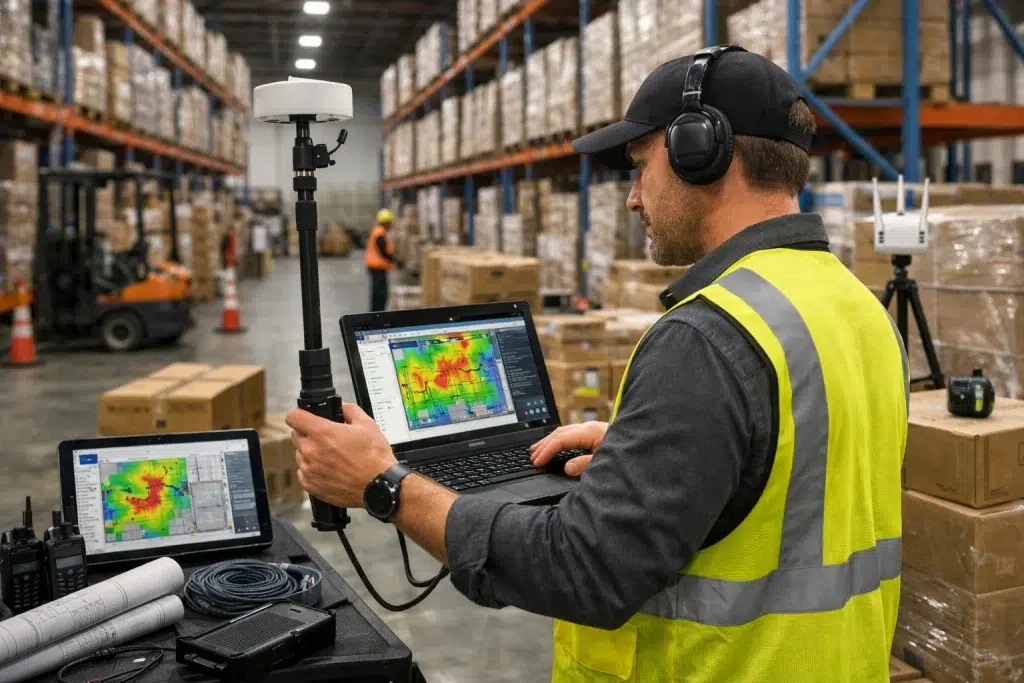
Warehouse WiFi Survey Report: What to Expect
A strong wifi survey report warehouse document should do more than show colorful heatmaps. It should explain what is happening, why it is happening, and what to fix first. In this guide, we break down the most important wireless assessment deliverables and the survey documentation you should expect in 2026, especially for warehouses with scanners, forklifts, dock doors, and metal racking.
This article uses plain language and short sentences. It also includes real-world technician scenarios, common installation errors tied to TIA/EIA structured cabling practices, and clear corrective steps so you can evaluate any report with confidence.
WiFi Survey Report Warehouse: The Purpose of the Report (Not Just the Data)
A warehouse WiFi survey report is supposed to reduce risk. Therefore, the report should make decisions easier. It should help you avoid buying the wrong hardware, mounting APs in the wrong places, or missing wired-layer problems that look like WiFi issues.
Survey Documentation Should Answer Three Questions
- What is the problem? (coverage, interference, capacity, roaming, wired instability)
- Why is it happening? (racking, noise sources, channel overlap, PoE issues)
- What should we do next? (prioritized corrective steps and validation plan)
Corrective step: if the report only shows heatmaps without clear recommendations, ask for an addendum. Otherwise, you are paying for pictures, not a plan.
Wireless Assessment Deliverables: What a Professional Warehouse Survey Includes
Deliverables vary by vendor. However, warehouse-grade surveys usually include a consistent set of documents and findings. Therefore, use this section as your baseline checklist.
WiFi Survey Report Warehouse Deliverables (Core)
- Executive summary with key findings and risks
- Floor plan validation notes (what changed, what was assumed)
- Heatmaps for RSSI and SNR at device height
- Channel overlap and interference findings
- Roaming risk notes (turns, cross-aisles, dock transitions)
- Capacity notes for docks, packing, and staging
- Recommended AP placement approach (high mount vs aisle-end vs column)
- Wired-layer findings (PoE stability, uplinks, cabling risks)
- Prioritized corrective steps and phased plan (if needed)
- Validation plan (how success will be measured)
Survey Documentation That Adds Real Value
- Assumptions list (device types, inventory density, operating hours)
- Risk register (what could break the design later)
- Before/after comparison plan for survey updates
Internal linking suggestion: Link this section to your “Pre-Survey Checklist: Preparing Your Warehouse for WiFi Assessment” article so readers know how to prepare for better deliverables.
WiFi Survey Report Warehouse Heatmaps: What You Should See (And What You Should Not)
Heatmaps are useful, but they can also be misleading when they are oversimplified. Therefore, you should know which maps matter most in warehouses.
Wireless Assessment Deliverables: RSSI Heatmaps (Signal Strength)
RSSI maps show how strong the signal is across the floor plan. They are a starting point. However, strong signal does not guarantee stable performance.
Corrective step: require SNR maps too, because noise and interference are common in warehouses.
WiFi Survey Report Warehouse SNR Heatmaps (Signal Quality)
SNR maps show how clean the signal is compared to noise. Therefore, they often explain why scanners drop even when RSSI looks “green.”
Survey Documentation: Channel Overlap and Interference Maps
Warehouses often have long aisles that create RF corridors. As a result, overlap can get out of control if APs are not tuned. Therefore, overlap maps help prevent “we added APs and it got worse.”
Wireless Assessment Deliverables: Utilization or Capacity Notes
Coverage is not capacity. Docks and packing zones can be high-density. Therefore, the report should call out utilization risks and provide capacity recommendations.
Internal linking suggestion: Link this section to your “Warehouse WiFi Heatmap Analysis Explained” guide for deeper explanation of RSSI vs SNR vs overlap.
Real-World Technician Scenarios: How Survey Documentation Solves Real Problems
Good reports connect findings to symptoms. Therefore, here are common warehouse scenarios and what the report should include to solve them.
Scenario: “Scanners Drop at Aisle Turns” (WiFi Survey Report Warehouse Roaming Notes)
An IT tech hears, “It drops when I turn into Aisle 9.” The report should include roaming risk notes at turns and cross-aisles, not just aisle center coverage.
- What the report should show: overlap boundaries, SNR at turns, and channel plan risks
- Corrective steps:
- Tune transmit power to reduce sticky clients
- Adjust channel plan to reduce co-channel interference
- Reposition or add coverage at the turn, then re-validate roaming
Scenario: “Docks Are Slow During Rush” (Wireless Assessment Deliverables for Capacity)
Dock doors are full of metal, motion, and density. Therefore, the report should include capacity notes and utilization findings.
- What the report should show: utilization spikes, retries, and interference sources
- Corrective steps:
- Add capacity with careful AP placement and channel planning
- Segment traffic with VLANs and SSIDs for operations vs guest
- Validate during peak hours, not only off-hours
Scenario: “WiFi Drops Randomly” (Survey Documentation for Wired-Layer Checks)
Random drops often come from PoE or cabling issues. However, users report it as WiFi. Therefore, the report should include wired-layer findings.
Corrective steps: check PoE budgets, switch port errors, and certify critical runs before making RF changes.
TIA/EIA Installation Errors That Should Be Called Out in a Warehouse WiFi Survey Report
TIA/EIA structured cabling practices focus on labeling, documentation, and testability. In warehouses, these basics often break down due to rapid changes. Therefore, a strong report should call out cabling and documentation risks.
WiFi Survey Report Warehouse Finding: Unlabeled Drops and Missing Port Maps
If AP drops are unlabeled, troubleshooting takes longer and mistakes happen. As a result, APs get patched to the wrong VLAN or wrong switch.
Corrective steps:
- Label both ends of every AP run
- Maintain port maps by warehouse zone
- Store diagrams where techs can access them during incidents
Wireless Assessment Deliverables: Cabling Health and Certification Gaps
Bad terminations and untested runs can cause link flaps. Therefore, the report should identify suspect runs and recommend certification testing where needed.
Survey Documentation Issue: APs Powered by Random Injectors
Injectors get unplugged. They also get swapped. Therefore, the report should recommend standardized PoE switching and documented ports for stability.
Survey Documentation: How Recommendations Should Be Written (So You Can Act on Them)
Recommendations should be specific and prioritized. Therefore, look for clear “do this first” guidance.
WiFi Survey Report Warehouse Recommendations Should Include
- Priority order (critical, high, medium)
- What changes to make (placement, power, channels, VLANs)
- Why the change matters (what symptom it fixes)
- How to validate success (what to measure after)
- Any operational constraints (lifts, downtime windows, safety)
Corrective step: Ask for a phased plan if downtime is limited
If you cannot shut down operations, the report should include phased implementation steps. That way, you can improve WiFi without risking a full outage.
Wireless Assessment Deliverables: What “Good Validation” Looks Like After Changes
A survey report should not end at recommendations. Therefore, it should include a validation plan.
WiFi Survey Report Warehouse Validation Items
- Post-change heatmaps (RSSI and SNR) at device height
- Roaming tests at turns and cross-aisles using real devices
- Peak-hour checks for utilization and retries at docks
- Wired checks for PoE stability and port errors
Internal linking suggestion: Link this section to your “5 Signs Your Warehouse Needs a WiFi Survey Update” article to connect survey reporting with ongoing operations.
Conclusion: A Warehouse WiFi Survey Report Should Be a Roadmap
A professional wifi survey report warehouse should give you a roadmap, not just a snapshot. The best wireless assessment deliverables include heatmaps, interference findings, roaming notes, capacity risks, and wired-layer checks. Clear survey documentation also calls out TIA/EIA-style cabling and labeling gaps, because those issues often create “fake WiFi problems.”
If the report is actionable, you can budget, schedule, and validate improvements with confidence. That is the real value of a warehouse survey.
Schedule Your Free Warehouse WiFi Survey Report Review
Contact UniFi Nerds for a comprehensive warehouse WiFi survey report review and network assessment. We’re available 24/7 to explain wireless assessment deliverables, survey documentation, and the corrective steps that improve warehouse WiFi reliability.
Call: 833-469-6373 or 516-606-3774 | Text: 516-606-3774 or 772-200-2600
Email: hello@unifinerds.com | Visit: unifinerds.com
Free consultations • Phased implementation • Budget-friendly • Warehouse-ready design • 24/7 support