


UniFi WiFi Installation New York
WiFi you never have to think about — designed, installed, and proven for New York businesses since 1994.

A UniFi specialist — not a call center — replies fast.
"*" indicates required fields
Built Around How Your Business Actually Runs
Good WiFi isn’t a router with better antennas. It’s a plan: your floor plan, your walls, your headcount, and the apps your team can’t live without. Video calls collapse fast when roaming is messy. A restaurant POS can’t share a lane with the guest WiFi. A law office’s client files shouldn’t be reachable from the waiting room. We design for all of that first — then we mount hardware.
Offices and professional services.
The conference room is the WiFi’s final exam — a room full of laptops on the same video call, and it has to just work. We design for meeting-room density, clean roaming from desk to conference table, and separation between staff systems and visitor devices. Law, accounting, medical, agencies: if your business runs on calls and client files, this is your build.
Retail and restaurants.
The register is sacred. Your POS and payment systems get their own protected lane; guests get fast-enough WiFi with a speed cap and zero access to anything that matters; the kitchen printer stops mysteriously vanishing at 7pm. And it’s all sized for the Saturday rush, because that’s the only time that counts.
Multi-tenant buildings and property managers.
One properly segmented network can serve a whole building — each tenant walled off, management systems isolated, and documentation that makes the next tenant turnover a checkbox instead of a project. Landlord-grade WiFi is a genuine amenity now; we build it that way.
Warehouses and light industrial.
Scanners, tablets, cameras, and time clocks across big square footage with metal everywhere. We design for the racking, the forklifts, and the reality that inventory levels change the radio map week to week.
From “Our WiFi Is Terrible” to Done — in Five Steps
The consultation.
You talk, we listen, we ask the questions that matter. Free, 30 minutes, book it below.
The plan.
A written design — AP map, network layout, security setup — before anyone drills a hole. For bigger or trickier spaces we survey first and design from a heatmap, not a hunch.
The install.
Our crew, your schedule, minimal disruption. Access points mounted, cabling handled (we’re also a cabling company — one crew, no finger-pointing), everything configured.
The proof.
We walk the space, test the calls, load it up, and tune. Done means proven, not “the lights are green.”
The handoff.
Documentation and admin access — it’s your network, and you’ll actually own it. Then 24/7 support whenever you want us.
One Network, Properly Divided
Most small-business networks are one big open room: the owner’s laptop, the guest WiFi, the security cameras, the smart thermostat, and the payment system, all breathing the same air. That’s how a compromised phone in the waiting room becomes everyone’s problem.
A proper UniFi build divides the network into lanes — staff, guests, cameras and devices, payments — each walled off from the others. Guests get internet and nothing else. Your cameras can’t be reached from the guest network at all. The payment system talks only to who it must. None of this adds hassle for the people using the WiFi; it just quietly removes the ways things go wrong.
Staff
Your team’s systems and files.
Guests
Internet and nothing else.
Cameras & devices
Unreachable from guest WiFi.
Payments
Talks only to who it must.
This is standard on every network we build. It’s not an upgrade, it’s the floor.
A 25,000-Square-Foot Problem, Solved
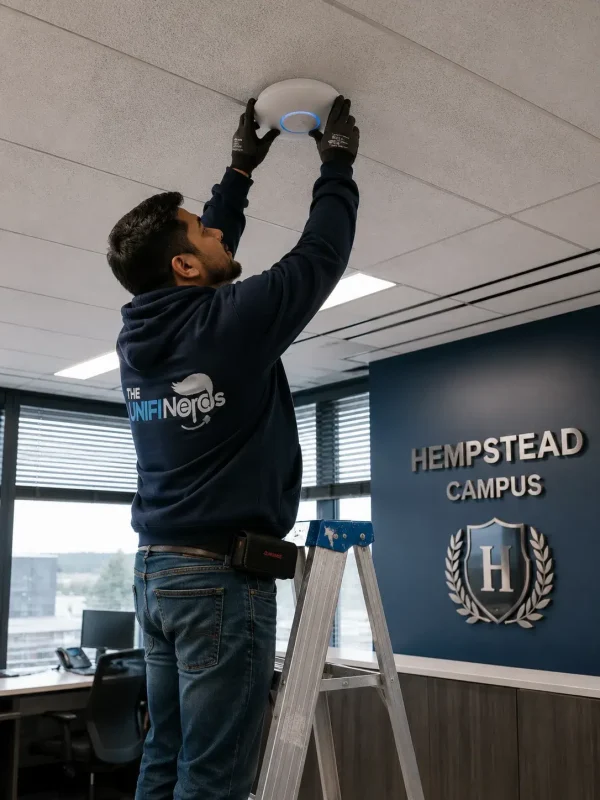
Hempstead Assembly of God had the classic big-space nightmare: a 25,000-square-foot main building plus three outbuildings, and a patchwork of consumer gear that couldn’t cover any of it. We surveyed the campus, designed one UniFi network across all four buildings, and installed it — clean coverage, one dashboard, no dead zones between the front door and the back lot.
At the other end of the scale, our biggest job ran a couple hundred access points through a 500-room hotel. Whatever your version of “too big, too weird, too many walls” is — the approach is the same: survey, design, install, prove.
WiFi Changes. We Keep Up.
New hires, new floor plan, thirty new devices, a neighbor with a screaming-loud network — WiFi that was perfect in January can wobble by June. Our support keeps it boring:
Monitoring and alerting
We usually know before you do. An AP goes down at 6am, we’re often fixing it before the first employee badges in.
Firmware on a schedule
Updates are planned and tested, not “auto-update broke the switch at 9am.”
Tuning as you grow
More people and more devices shift the load; we shift with it.
A 24/7 number where a person answers
Every day of the year, including the ones ending in “eve.”
Every install includes 30 days of post-install support. After that, stay on a plan or call us when you need us — the documentation is yours either way, which is exactly why clients stay.
The Honest Version
UniFi gives you enterprise-grade WiFi without per-device license fees — one dashboard, whether you run one office or ten, and the hardware is yours outright. The catch nobody mentions: UniFi rewards good design and punishes bad design. There’s no giant vendor support contract to hide behind. That’s why the install matters so much — and why “my cousin set it up” networks are half our rescue business.
The design part is what we’ve spent 30 years getting right. Certified specialists, our own employees on every job, documentation on every handoff — and the Mets, Estée Lauder, and the Department of Homeland Security on the client list if you want the name-drops. The 40-person office in Queens gets the same crew and the same standard.
WiFi Questions, Answered
Honest answer: it depends on the space and whether infrastructure (cabling, power) already exists. A complete small-office build typically lands between $2,000 and $5,000; larger spaces scale from there. The consultation gets you a firm, itemized number — free, before anything starts.
Design, placement planning, mounting, configuration, security segmentation, tuning, validation testing, and documentation. The install is done when the WiFi is proven.
Fewer than you fear, more than a guess — it depends on construction, headcount, and usage. The consultation answers it precisely before you buy hardware.
Yes — when it’s designed and installed right. Most “UniFi problems” we get called to fix are design and configuration problems wearing a UniFi badge.
Usually, yes — and we’d rather. Free audit, we keep what’s good, flat-price rescue for the cleanup. Details on the hub page.
Small offices: often a single day. Multi-floor or multi-building projects: we phase it so you’re never offline during business hours. You’ll have a real timeline in the written plan before we start.
Yes — we’re a full cabling company as well, Fluke-certified testing and all. One crew for the wire and the WiFi means nothing gets lost between contractors. Cabling details here.
Manhattan, Brooklyn, Queens, Nassau County, and Central & Northern New Jersey — our own crew, no subcontractors.
Thirty Minutes. Real Answers. Zero Pressure.
Book the free consultation. Worst case, you spend half an hour learning exactly what’s wrong with your WiFi and what it would take to fix it — from someone who’s fixed it a few thousand times.