10 Signs Your NYC Office Needs a Structured Cabling Upgrade
If your office internet is “fast” but your network still feels slow, unstable, or unpredictable, the problem may not be WiFi or your ISP. It may be your wiring. A structured cabling upgrade NYC is often the highest-return infrastructure improvement an office can make, especially in New York City where older buildings, tenant buildouts, and constant changes create hidden cabling issues. This guide covers 10 practical signs of outdated office cabling, the most common network performance issues they cause, and how to approach a cabling assessment NYC without wasting time or money.
The goal is not “new cables for the sake of it.” The goal is a network foundation that supports modern WiFi, VoIP, security cameras, and growth without daily troubleshooting.
Why cabling problems show up as “network performance issues”
When cabling is messy, damaged, unlabeled, or undersized, the network becomes fragile. However, the symptoms often look like WiFi problems or “internet issues.” Therefore, offices replace routers and access points when the real fix is the physical layer.
Real-world scenario
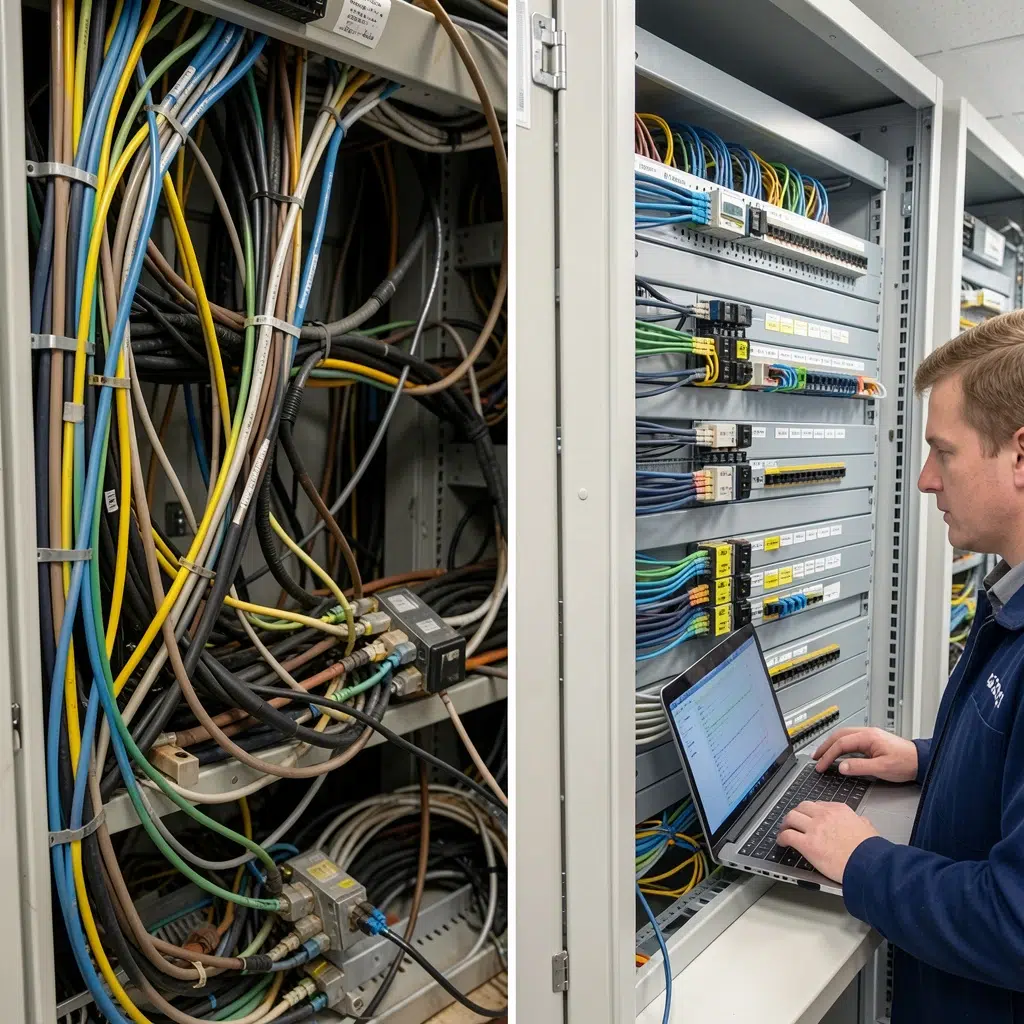
An NYC office upgrades to a new WiFi system and still has dropped calls and slow file access. After a cabling assessment, they discover old cable types, poor terminations, and multiple “mystery” patch cords feeding critical rooms. Once the cabling is cleaned up and documented, the same WiFi performs dramatically better.
Expert Insight: In NYC, cabling problems are often layered over years of tenant changes. Every “temporary fix” becomes permanent. A structured cabling upgrade is not just about speed. It is about making the network supportable and predictable.
10 signs you need a structured cabling upgrade NYC
1) You have frequent “random” disconnects on wired devices
If desktops, printers, or conference room systems drop off the network intermittently, cabling is a prime suspect. Loose terminations, damaged cable, and poor patching can cause unstable links that look like software problems.
2) PoE devices reboot or behave inconsistently
WiFi access points, VoIP phones, and cameras often use Power over Ethernet (PoE). If these devices reboot, fail to power up, or “work sometimes,” you may have outdated office cabling, bad terminations, or PoE budget issues on switches.
3) Your network closet is a “spaghetti rack”
If the rack is a tangled mess with unlabeled patch cords, troubleshooting becomes slow and risky. In addition, messy racks increase the chance of accidental outages during simple changes.
4) Nobody can answer “what does this port go to?”
If your team cannot trace a wall jack to a switch port quickly, you do not have structured cabling. Therefore, every move, add, or change becomes expensive and disruptive.
5) You rely on unmanaged switches under desks
Small switches under desks are common in offices that outgrow their cabling. However, they create performance bottlenecks, power issues, and security blind spots. They are often a sign that you need more properly planned drops.
6) Conference rooms are unreliable (even with good WiFi)
Conference rooms often need stable wired connections for video systems, VoIP, and screen sharing. If meetings fail due to drops, jitter, or “it worked yesterday,” cabling and switching should be checked first.
7) You are adding more WiFi access points but performance is not improving
Adding APs can help, but only if the wired backhaul is solid. If APs are fed by questionable cabling or daisy-chained switches, performance will stay inconsistent. Therefore, a cabling assessment NYC is often the next step.
8) Your office has grown, but the cabling plan never changed
Many NYC offices expand headcount, add rooms, and increase device counts without upgrading the physical layer. Over time, the network becomes a patchwork of extensions and workarounds.
9) You are planning cameras, access control, or more VoIP phones
Security cameras and access control systems add constant network traffic and PoE requirements. If your cabling is outdated, you may struggle with power, stability, and clean installation.
10) Your cabling is old, mixed, or unknown
If you do not know what cable types are installed (Cat5e, Cat6, Cat6A), or you see mixed standards and inconsistent terminations, you likely have outdated office cabling. In NYC, older buildouts can hide years of partial upgrades.
Tips: Quick ways to confirm if cabling is the problem
- Check if problems are tied to specific rooms, desks, or wall jacks (location-based issues often point to cabling).
- Look for PoE devices that reboot or show link speed changes (a common cabling symptom).
- Ask for a port map and labeling standard. If it does not exist, start with an assessment.
Common mistakes during a structured cabling upgrade
Even when offices decide to upgrade, projects can still go sideways. However, most problems come from unclear scope and missing standards.
Common Mistakes: What makes cabling upgrades more expensive than they need to be
Upgrading without a plan. If you do not map endpoints and growth needs, you will end up with more “temporary” fixes.
Skipping labeling and documentation. The upgrade is not complete if you cannot trace ports quickly.
Not coordinating with building requirements. NYC access rules, risers, and firestopping can cause delays if ignored.
How to run a cabling assessment NYC (a practical checklist)
A cabling assessment NYC should be structured, not just a quick glance at the rack. Therefore, you get clear answers and a plan you can execute in phases.
Assessment checklist
- Inventory endpoints: desks, conference rooms, printers, APs, cameras, phones.
- Inspect the rack: patch panels, cable management, labeling, and switch layout.
- Trace and label: identify unknown runs and create a port map.
- Test cabling: verify performance and identify bad terminations or damaged runs.
- Review PoE needs: confirm switch PoE budgets for APs, phones, and cameras.
- Plan pathways: confirm conduit, tray, and riser access with building management.
- Define deliverables: labeling standard, as-builts, and documentation format.
Expert Insight: The best assessments produce a phased plan. Many NYC offices cannot shut down for a full re-cable. A phased approach lets you fix the worst areas first (conference rooms, AP runs, and critical desks) while keeping the business running.
Best practices for a structured cabling upgrade NYC
- Standardize cable types: use a consistent approach (often Cat6/Cat6A plus fiber where needed).
- Use patch panels: avoid direct terminations into switches.
- Label everything: both ends of every run, consistently.
- Document the network: port maps, rack diagrams, and endpoint lists.
- Plan for PoE: APs, phones, and cameras need power budgets and clean runs.
- Coordinate building rules: access, firestopping, and after-hours work windows.
FAQ: structured cabling upgrades in NYC offices
How often should an office upgrade cabling?
There is no single schedule, but many offices reassess cabling during expansions, moves, major WiFi upgrades, or when recurring network performance issues appear. If your cabling is unlabeled, inconsistent, or repeatedly failing, it is time for an assessment.
Can outdated office cabling cause slow WiFi?
Yes. WiFi access points rely on wired backhaul and PoE power. If the cabling feeding APs is poor, damaged, or undersized, the WiFi experience can suffer even if the wireless design is good.
What is included in a structured cabling upgrade NYC project?
Typically: new cable runs, patch panels, rack cleanup, labeling, testing, and documentation. Many projects also include planning for PoE devices, backbone links between floors, and a phased rollout to reduce downtime.
How do I reduce downtime during a cabling upgrade?
Use a phased plan, schedule disruptive work after-hours, and prioritize critical areas first. Clear documentation and pre-staging equipment also helps reduce surprises.
What deliverables should I expect after the upgrade?
You should receive a port map, labeling standard, as-built documentation, and test results. These deliverables are what make the upgrade valuable long-term.
Conclusion: if your network feels unstable, your cabling may be the real issue
Many NYC offices chase WiFi upgrades and new routers when the real problem is the physical layer. If you see multiple signs of outdated office cabling, recurring network performance issues, or you cannot trace ports confidently, a structured cabling upgrade NYC is often the most effective fix. Start with a cabling assessment NYC, build a phased plan, and upgrade the foundation that everything else depends on.
Once your cabling is clean, labeled, tested, and documented, your WiFi, VoIP, and cameras become easier to support and far more reliable.
Want to Know If Your NYC Office Cabling Is Holding You Back?
We’ll assess your cabling, identify the biggest performance risks, and build a phased upgrade plan—so your office network stays fast, stable, and ready for growth.
Call: 833-469-6373 or 516-606-3774
Text: 516-606-3774 or 772-200-2600
Email: hello@unifinerds.com | Visit: unifinerds.com
Free consultations • Phased implementation • Budget-friendly • Expert support