
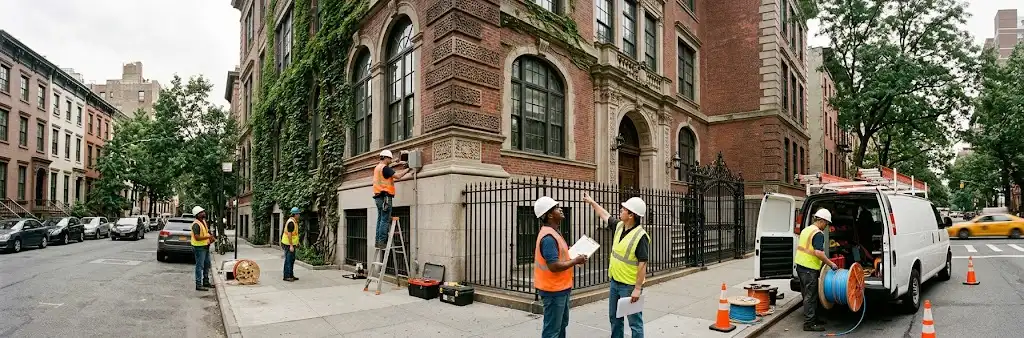
Picture a Manhattan independent school. It probably doesn’t look like a campus. More likely it’s a converted townhouse or a pair of brownstones, with narrow stairs, thick plaster walls, and a network closet the size of a coat rack. That’s what makes private school network installation in NYC so different. The building fights you at every turn, and yet the school still needs WiFi that works in every classroom.
We’ve worked with schools in Washington and Boston on this same problem. Manhattan just turns the difficulty up a notch. So this guide is written for heads of school and business managers who want a straight answer. What does a good school network look like here, and what should you plan for before budget season in January?
Why Prewar Townhouses Make School WiFi Hard
Old buildings eat WiFi. Plaster over metal lath, brick party walls, and steel beams all block the signal. As a result, one access point in the hallway won’t reach the classrooms on either side. Teachers end up with a strong signal by the door and nothing at the back of the room.
The fix is more access points, placed inside the rooms that need them. That only works if you know where the signal actually goes. So every project starts with a walk-through, and our guide to school WiFi site surveys explains what we measure. Then there’s the closet problem. Townhouse schools rarely have room for a full rack, so we design around compact switches and smart cable paths instead of forcing a big setup into a small space.
School BYOD Network Design for Real Classrooms
A single middle school class can bring 50 devices into one room. Laptops, tablets, phones, and smartwatches all want a connection at the same time. That density is the real test, not the size of the building. Because of that, a good school BYOD network design focuses on capacity first.
We also split the network into separate lanes. Students get one network, faculty get another, and school systems like printers and smart boards sit on a third. That way a room full of streaming video never slows down a teacher’s attendance app. We go deeper on this in our post on BYOD density and safer access, including how content filtering fits in.
Parent WiFi Without the Risk
Parents spend more time in the building than people think. They come for pickup, performances, conferences, and fundraisers. Naturally, they want WiFi. The trick is giving it to them without opening a door into the school’s private systems.
A separate guest network handles this cleanly. Parents sign in through a simple branded page, and their devices stay walled off from student and staff traffic. You can also limit bandwidth during the school day, then open it up for the evening concert. In short, families feel welcome while your sensitive data stays put.
Preschool Security Cameras and Entry Control
For a Manhattan school, the front door is the sidewalk. There’s no long driveway and no security booth. That’s why entry cameras matter so much, especially for younger students. Preschool security cameras should cover the entrance, the stoop, and the street-facing windows.
UniFi Protect records all of it to a recorder you own, and staff can check any camera from a phone. Meanwhile, UniFi Access controls who gets through the door with fobs, codes, or a buzzer that front-desk staff answer. Every entry gets logged with a time stamp. We plan both together using our camera placement guide and access control checklist, so nothing gets missed at the door.
Planning a School WiFi Upgrade in Manhattan Around the Calendar
Schools can’t shut down for a week of construction. So timing is everything. Most independent schools set next year’s budgets in January, which means December is the right time to get a real quote. After that, the install itself usually lands over spring break or summer.
We also phase the work when budgets are tight. For example, you might start with the classrooms that complain the most, then add cameras and door access the next year. If you’d like to see how we’ve handled this for other schools, our private school WiFi installation post covers the earlier projects in this series.
FAQs About Private School Network Installation in NYC
Why does our WiFi drop in some classrooms but not others?
Old townhouse walls block the signal unevenly. Plaster, brick, and steel all weaken it. Usually the answer is placing access points inside the classrooms rather than in the hallways.
Can parents use the WiFi safely?
Yes. A separate guest network keeps parent devices away from student and staff systems. You can also limit its speed during class hours.
Can cameras and door access run on the same system?
They can. UniFi Protect and UniFi Access share the same network and dashboard. So your staff manage WiFi, cameras, and entry from one place.
When should we install without disrupting classes?
Most schools install over spring break or summer. Getting a quote in December fits January budget planning, which keeps that schedule realistic.
Final Thoughts
A Manhattan school has to do a lot inside a small, old building. It needs WiFi for every student device, a safe network for parents, and a front door that stays secure right on the sidewalk. None of that is out of reach. It just takes a plan built around the building you actually have. Get the walk-through done before January, and next year’s budget will be built on real numbers instead of guesses.
Free Campus Network Assessment
Running a private school or preschool in Manhattan? We’ll walk your building, test every classroom, and give you a clear plan for WiFi, cameras, and entry control before budget season.
Call: 833-469-6373 or 516-606-3774
Text: 516-606-3774 or 772-200-2600
Email: hello@unifinerds.com | Visit: unifinerds.com
Free consultations • Phased implementation • Budget-friendly • Expert support