Best Practices for Low Voltage Cabling in NYC Commercial Renovations
Commercial renovations in New York City move fast. Walls go up, ceilings close, and trades overlap. If your network cabling plan is late or unclear, you end up paying for rework, change orders, and downtime after move-in. That’s why low voltage cabling NYC should be treated like a core part of the renovation schedule, not a last-minute task. In addition, choosing the right renovation cabling contractor and coordinating office remodel networking with your GC and electrical team can prevent the most common problems we see in commercial wiring NYC projects.
This guide covers practical best practices that help NYC offices get clean, supportable cabling during renovations—based on real-world field experience, common failure points, and standards-based installation methods.
Target audience: NYC office managers, operations leaders, IT managers, general contractors, and commercial property managers managing office renovations, expansions, and tenant improvements.
Why low voltage cabling is harder during NYC renovations
Renovations are different from new construction. You’re working around existing walls, legacy pathways, and building rules. Therefore, the cabling plan must be flexible but still standards-based.
Common NYC renovation constraints
- Limited ceiling access or mixed ceilings (open + hard lid)
- Strict work windows (after-hours, weekend-only ceiling work)
- Freight elevator scheduling and delivery restrictions
- Existing conduit or pathways that are full or undocumented
- Firestopping and penetration rules that vary by building
- Multiple trades competing for the same pathways
Real-world scenario: A midtown office remodel adds conference rooms and new WiFi coverage. The cabling team arrives after framing, but the ceiling is already closed in key areas. The result is surface raceway, extra conduit, and higher cost—because the cabling plan was not aligned with the renovation sequence.
Expert Insight: In NYC renovations, the best cabling work happens early—before ceilings close and before the GC is forced to “make room” for cable pathways. If you schedule low voltage late, you pay more and get a less elegant result.
Best practice #1: Start with a port map and a “network intent” plan
Before anyone pulls cable, you need a simple plan that answers two questions: “Where do we need ports?” and “What is each port for?” Therefore, build a port map that is easy for both IT and construction teams to follow.
What to include in your port map
- Workstations (typically 2 data ports per desk area, depending on your setup)
- Conference rooms (table ports, wall display ports, and a dedicated AP drop)
- WiFi access points (ceiling drops placed for coverage and capacity)
- Printers and shared devices
- Security cameras and access control (if applicable)
- Network closets (MDF/IDF locations and rack requirements)
Why “network intent” matters
When you define intent, you avoid random installs. In addition, you can plan PoE needs and VLAN segmentation early.
- Data ports for users
- PoE ports for phones, APs, cameras, and access control
- Dedicated drops for AV and conference room systems
Tips: Fast port map rules that work well in office remodel networking
- Standardize desk drops so moves and adds are easy later.
- Always plan separate drops for WiFi APs instead of relying on mesh.
- Give every conference room a clear “AV + network” bundle (display, table, AP).
Best practice #2: Choose cable type based on PoE and future needs (not guesses)
Most NYC offices default to Cat6 or Cat6A. However, the right choice depends on your environment and power needs. Therefore, decide based on what you’re actually deploying.
When Cat6 is often fine
- Standard office endpoints with moderate PoE requirements
- Shorter runs in typical floor layouts
- Budgets that prioritize more drops over higher cable category
When Cat6A is often worth it
- PoE-heavy environments (WiFi APs, cameras, access control)
- Higher performance needs and future-proofing
- Offices that want more headroom for upgrades over the next lease cycle
In addition, if your renovation includes new switches or WiFi upgrades, align the cabling choice with that roadmap.
Expert Insight: Cable category decisions should be tied to PoE loads and lifecycle planning. If you’re adding WiFi 6/6E/7 access points and cameras, the cabling should support stable power delivery and long-term performance.
Best practice #3: Treat pathways as a deliverable (not an assumption)
In commercial wiring NYC, pathways are often the real project. Therefore, your cabling scope should clearly define how cables will be supported and routed.
Pathway methods commonly used in NYC offices
- J-hooks (when allowed and installed correctly)
- Cable tray (great for dense runs and clean support)
- Conduit (often required in corridors or specific building zones)
- Surface raceway (last resort, but sometimes necessary)
What to confirm with your renovation cabling contractor
- Which areas require conduit vs open pathway support
- How penetrations will be handled (including firestopping)
- How pathways will be coordinated with HVAC, electrical, and sprinkler trades
Real-world scenario: A contractor quotes “per drop” assuming open ceiling pathways. The building requires conduit in the hallway. The project gets hit with change orders because the pathway assumption was never documented.
Common Mistakes: Pathway issues that cause delays and rework
No pathway plan. Cable ends up draped across ceiling grid or bundled on sprinkler pipe (not acceptable).
Late coordination. Other trades fill the ceiling space and block routes.
Ignoring firestopping. Penetrations are made without proper sealing, creating compliance issues.
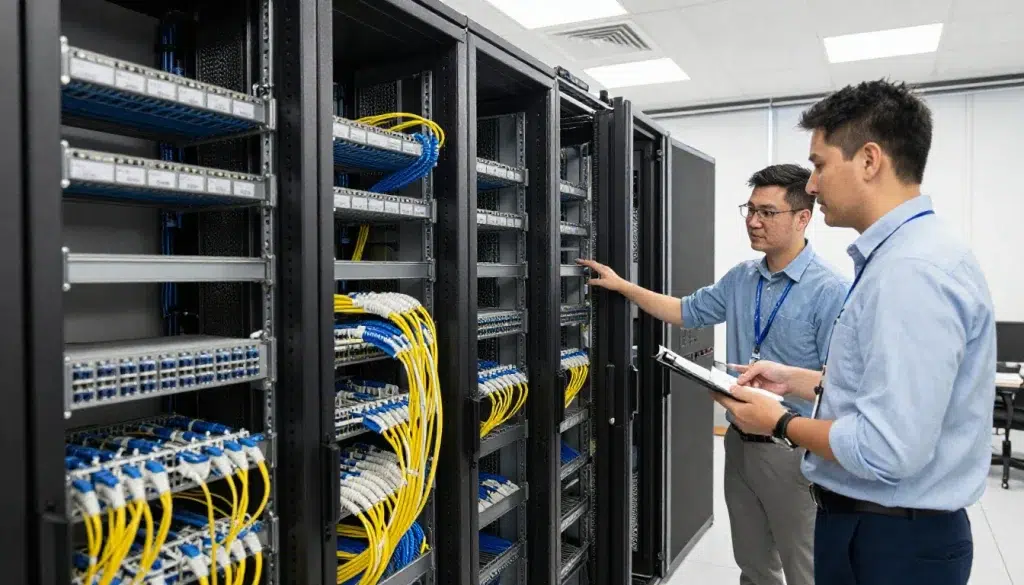
Best practice #4: Build the network closet like a “serviceable system”
Your cabling is only as good as your closet. Therefore, a clean rack buildout with proper patching and labeling is essential for long-term support.
Closet best practices for office remodel networking
- Use patch panels sized for current drops plus growth
- Use horizontal and vertical cable management
- Keep bend radius and strain relief correct
- Separate copper and fiber management where applicable
- Plan UPS power and cooling/ventilation
Labeling and documentation standards
- Label both ends: patch panel port and wall plate
- Use a consistent naming scheme (Floor-Room-Port)
- Deliver a port map that matches the labels
In addition, ask for photos of the final rack and patch panels. This helps remote support and future vendor handoffs.
Tips: What to request in your final cabling handoff package
- Port map (spreadsheet or PDF) tied to patch panel IDs.
- Test results tied to the same port IDs.
- Rack photos that show patch panels, switches, and labeling clearly.
Best practice #5: Test and validate before the office goes live
Renovation timelines are tight, so testing is often rushed. However, this is where problems hide. Therefore, build testing into the schedule as a required milestone.
Testing levels (simple explanation)
- Basic testing: verifies link/continuity and that the cable works.
- Certification testing: verifies performance to a standard and provides a report.
Validation beyond testing
- Confirm WiFi AP drops are in the correct locations
- Verify conference room ports match the AV plan
- Confirm PoE devices power up reliably (APs, phones, cameras)
- Spot-check labeling accuracy (outlet to patch panel)
Real-world scenario: An office opens Monday morning. Two conference rooms have no connectivity because the ports were terminated but never patched correctly. A simple pre-go-live validation would have caught it.
Expert Insight: The best time to find cabling problems is before users move in. After move-in, every fix becomes disruptive, and troubleshooting time costs more than the original testing would have.
Best practice #6: Coordinate low voltage with the renovation schedule (trade sequencing)
Low voltage should be scheduled like a trade, not like a “task.” Therefore, align your cabling milestones with construction phases.
A practical sequencing approach
- Pre-wire planning: port map, closet plan, pathway plan
- Rough-in: cable pulls before ceilings close
- Trim-out: termination, faceplates, patch panels
- Testing: basic or certification testing
- Handoff: documentation, labeling verification, as-builts
In addition, coordinate with the GC on work windows. Many NYC buildings have strict rules for ceiling access and noise.
Industry standards to reference (simple and practical)
Standards help define what “good” looks like, even if you’re not technical. In addition, they make vendor expectations clearer.
- ANSI/TIA-568: structured cabling performance and installation practices
- ANSI/TIA-606: labeling and administration standards
- NEC considerations: safety and pathway requirements (environment-dependent)
FAQ: low voltage cabling NYC for commercial renovations
When should low voltage cabling be scheduled in an NYC renovation?
As early as possible—ideally before ceilings close and before other trades fill pathways. Rough-in should happen during framing and ceiling prep, not after finishes.
What’s the biggest cost driver in commercial wiring NYC projects?
Access constraints and pathways. After-hours rules, conduit requirements, and limited ceiling access often drive costs more than the cable itself.
Do I need certification testing for office remodel networking?
Not always, but it is strongly recommended for Cat6A and PoE-heavy environments. Certification testing provides proof that the cabling meets performance standards.
How do I prevent change orders during renovation cabling?
Define scope clearly: port map, pathway assumptions, testing level, labeling, documentation, and building access rules. Then require written change orders before extra work starts.
What should I receive at the end of a low voltage cabling NYC project?
You should receive consistent labeling, a port map, test results, and a clear handoff package that makes the network supportable for years.
Conclusion: clean cabling is the foundation of a stable NYC office network
During commercial renovations, low voltage cabling NYC is one of the highest-leverage investments you can make. When the port map is clear, pathways are planned, closets are built cleanly, and testing is scheduled, your office network becomes easier to support and easier to expand. In addition, you reduce the risk of change orders and avoid the “we’ll fix it after move-in” chaos that slows down real business.
Planning a NYC Renovation? Don’t Let Cabling Become a Surprise Cost
We’ll coordinate with your GC, map your ports, plan pathways, and deliver clean labeling and testing—so your office remodel networking is stable from day one.
Call: 833-469-6373 or 516-606-3774
Text: 516-606-3774 or 772-200-2600
Email: hello@unifinerds.com | Visit: unifinerds.com
Free consultations • Phased implementation • Budget-friendly • Expert support