What is switch aggregation? It is a networking method that combines multiple physical links into one logical connection — increasing bandwidth, improving fault tolerance, and keeping critical connections online even if a single cable fails. If you’ve heard terms like “UniFi port aggregation,” “link aggregation,” or “LACP” and felt lost, this guide is for you. In the sections below, you’ll learn what an aggregation switch does, how it works inside the UniFi ecosystem, and why it makes networks faster and more resilient under real-world load. In addition, we’ll cover the features that matter most and when aggregation is actually worth setting up.
What Is Switch Aggregation? A Plain-English Overview
Switch aggregation is a networking method that combines multiple physical links into one logical connection. In other words, you bundle ports together so they behave like a single, higher-capacity link. This approach can increase bandwidth, improve fault tolerance, and reduce the chance of a single cable taking down a critical connection. As a result, your network stays faster and more stable during heavy use.
When you use UniFi port aggregation, you can support high-demand traffic more easily. For example, it’s useful for uplinks between switches, storage traffic, or busy server connections. In addition, this capability helps set UniFi apart from other networking solutions. That’s why many businesses choose aggregated links when performance and scalability matter.
What Is an Aggregation Switch and How Is It Different?
An aggregation switch — sometimes called a distribution switch — sits between your access layer switches and your core router or firewall. What does an aggregation switch do? It aggregates, or consolidates, the uplinks from multiple edge switches into a single, high-capacity connection toward the core of your network. This removes the bottleneck that would otherwise occur when several busy access switches all funnel traffic through a single standard uplink.
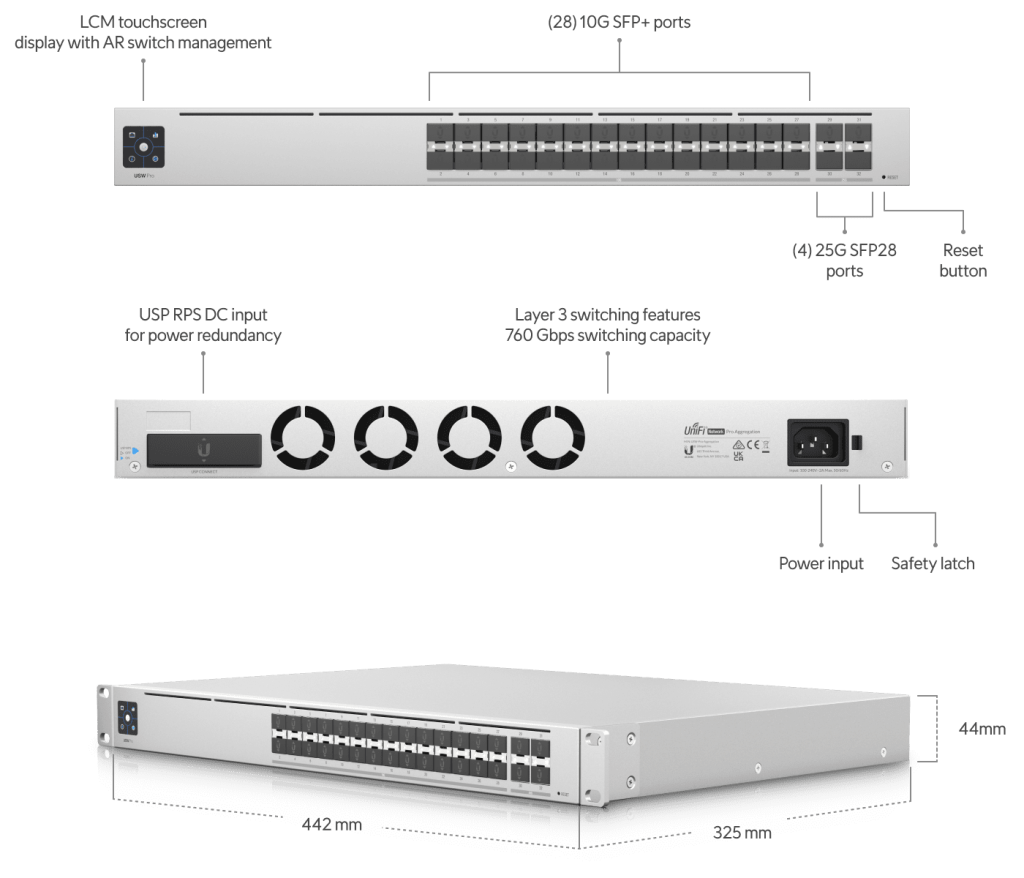
In a UniFi deployment, the UniFi network design typically places an aggregation switch — such as the UniFi Switch Aggregator (USW‑Aggregation) — at the top of each IDF stack. This switch provides multiple SFP+ 10G ports, giving every access switch a dedicated high-speed uplink while the aggregation switch itself connects to the core over a bonded 10G or 25G link. The result is a clean three-tier hierarchy that scales without rewiring.
UniFi Port Aggregation Features You’ll Actually Use
UniFi port aggregation isn’t just about raw speed. It also improves reliability and flexibility. Below are the features most people care about first.
- More bandwidth: Bundling links increases total throughput. Therefore, you can move more data without creating bottlenecks.
- Better uptime: With redundant uplinks, traffic can shift if one link fails. As a result, you maintain connectivity and reduce downtime. This is especially helpful for critical connectivity.
- Flexible setup options: You can choose modes like LACP or static. In addition, you can tune load balancing and failover behavior to match your network goals.
- Centralized control: Because it’s part of the UniFi ecosystem, you can manage aggregated uplinks through the UniFi Controller. That way, monitoring and configuration stay simple.
If you want a quick rule of thumb, focus on clean cabling and consistent configuration. That way, your aggregated links deliver predictable performance. A proper structured cabling installation is the foundation that makes port aggregation reliable long-term.
What Does an Aggregation Switch Do in Real Networks?
Implementing aggregated uplinks can improve both performance and uptime. More importantly, it helps your network handle growth without constant redesign. As a result, your switching layer stays ready for new devices and heavier traffic.
- Smoother performance: Bundled links boost throughput and reduce bottlenecks. Therefore, users see better performance during peak usage.
- Stronger reliability: Redundancy helps prevent outages from a single bad cable. In addition, failover keeps traffic moving when one path drops.
- Easier management: UniFi Controller makes configuration simpler. As a result, you spend less time troubleshooting.
- Room to grow: As your network expands, you can add switches and uplinks without sacrificing performance. In other words, you can scale cleanly.
For deeper planning, a professional WiFi site survey helps identify where aggregated uplinks add the most value before any hardware is purchased. In addition, it explains when aggregation makes sense and when it’s overkill.
UniFi Port Aggregation Setup Help from the UniFi Nerds
At The UniFi Nerds, we help clients harness the power of UniFi networking solutions. Whether you’re a networking enthusiast or a business owner, we can design and deploy UniFi port aggregation the right way. In addition, we can help with cabling, uplink planning, and clean rack layouts. That way, your link aggregation stays stable and your bandwidth gains are real.
Every aggregation switch deployment we handle includes structured cabling certification, uplink verification, and documentation — so you know exactly what’s running and why. Our team holds active UniFi certifications and has deployed aggregation-layer switching in warehouses, high-rises, retail chains, and data centers across New York and Florida.
Ready to upgrade? UniFi switch aggregation can be the difference between “it works” and “it works under pressure.” Book a free consultation with the UniFi Nerds today.
Frequently Asked Questions About UniFi Switch Aggregation
What is switch aggregation?
Switch aggregation is a method of combining multiple physical network links into one logical connection. This increases available bandwidth, adds redundancy, and reduces the risk of a single link failure disrupting traffic. In a UniFi network, switch aggregation is configured through the UniFi Controller using LACP (Link Aggregation Control Protocol) or a static LAG (Link Aggregation Group).
What is an aggregation switch?
An aggregation switch is a network switch that sits between the access layer (edge switches) and the core layer (router or firewall). Its job is to consolidate uplinks from multiple access switches into a high-speed connection to the network core. In UniFi deployments, the USW-Aggregation is a purpose-built aggregation switch offering multiple 10G SFP+ ports for exactly this role.
What does an aggregation switch do?
An aggregation switch collects traffic from multiple lower-tier switches and forwards it upstream through a high-capacity link. It prevents bottlenecks by giving each access switch its own dedicated high-speed uplink. It also improves fault tolerance — if one uplink fails, bonded links allow traffic to continue flowing through the remaining active paths.
What is UniFi port aggregation?
UniFi port aggregation is the process of bonding two or more switch ports into a single logical link using the UniFi Controller. This is done through the Link Aggregation (LAG) setting on supported UniFi switches. The result is higher throughput and built-in redundancy between network devices — all managed from the same UniFi dashboard you use for everything else.
Do I need an aggregation switch for my UniFi network?
Not always — it depends on the size and traffic demands of your network. For small offices with one or two switches, a standard UniFi switch with a single uplink is usually sufficient. For larger deployments with multiple IDF closets, high-throughput servers, or NAS storage, an aggregation switch prevents uplink bottlenecks and improves overall performance. The UniFi Nerds can assess your environment and recommend the right switching architecture. Contact us for a free consultation.