Warehouse WiFi Standards Explained: 802.11ax, Wi‑Fi 6, and Beyond
If your warehouse WiFi feels “random,” you’re not alone. Scanners drop at the end of aisles, forklifts lose sessions while roaming, and voice picking gets choppy during peak shifts. Many teams respond by adding access points, but that often makes things worse. The real fix starts with understanding warehouse wifi standards and how they affect coverage, capacity, and roaming in industrial spaces. In this guide, we’ll break down wifi 6 warehouse design in plain language, explain what 802.11ax industrial really means, and show how warehouse wireless protocols influence real-world performance.
Target audience: warehouse managers, operations leaders, IT managers, and logistics teams who need reliable WiFi for scanners, tablets, forklifts, voice picking, cameras, and IoT devices in distribution centers and industrial facilities.
Warehouse WiFi standards: the simple map (what the names mean)
WiFi “standards” are technical versions that define how devices communicate over the air. Therefore, they impact speed, reliability, and how well many devices share the same network.
- 802.11n = WiFi 4 (older, still common in legacy scanners)
- 802.11ac = WiFi 5 (common in many warehouses today)
- 802.11ax = WiFi 6 / WiFi 6E (modern efficiency and capacity improvements)
- 802.11be = WiFi 7 (newer generation; adoption depends on device support)
However, “newer” does not automatically mean “better for your warehouse.” The best standard is the one your devices support and your environment can use effectively.
Expert Insight: In warehouses, the limiting factor is often not peak speed. It’s airtime efficiency, roaming stability, and interference control. WiFi 6 helps most when you have many devices and busy workflows—not when you just want a faster speed test.
Why warehouses are different: the RF realities standards can’t “fix” alone
Even the best WiFi standard cannot overcome a bad RF environment. Therefore, your design and validation matter as much as the protocol version.
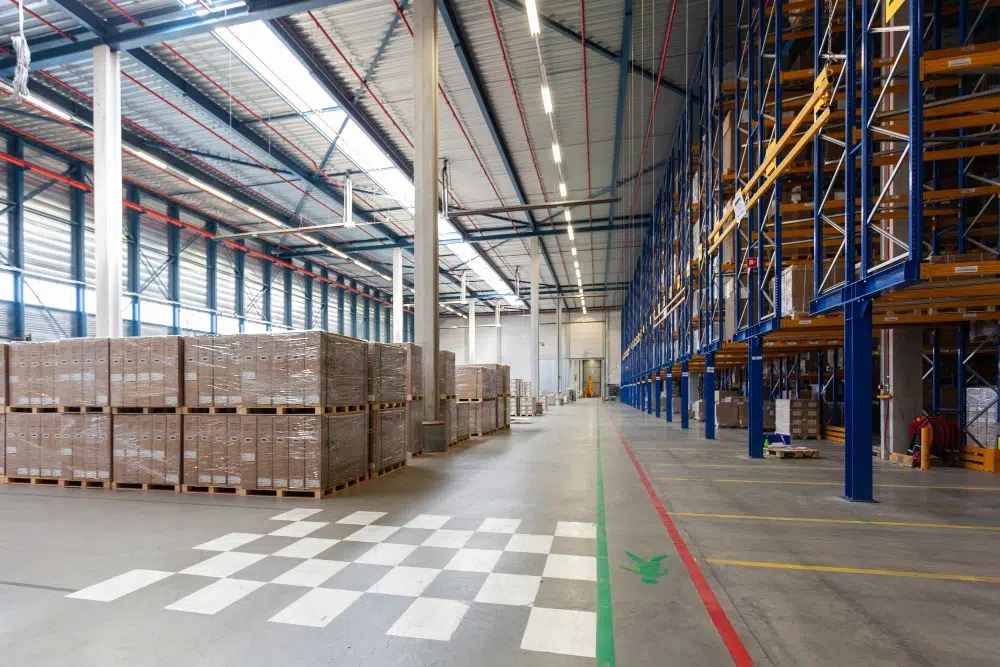
Warehouse conditions that impact WiFi performance
- Metal racking that reflects and blocks signals
- Long aisles that behave like RF tunnels
- High ceilings that tempt installers to mount APs too high
- Changing inventory levels that change RF absorption
- Moving devices that require stable roaming
- Industrial noise sources and neighboring networks
Real-world scenario: A warehouse upgrades to WiFi 6 access points but keeps the same placement and channel plan. Performance improves near the office, but scanners still drop in the far aisles. The issue is not the standard—it’s aisle coverage and roaming design.
802.11ax industrial: what WiFi 6 changes (in plain English)
802.11ax industrial (WiFi 6) is designed to make WiFi more efficient when many devices share the same airspace. Therefore, it can be a strong fit for warehouses with scanners, tablets, IoT sensors, and voice devices.
Key WiFi 6 features that matter in a warehouse
1) OFDMA: better “traffic control” for many devices
OFDMA helps the access point serve multiple devices more efficiently. Instead of one device taking the whole channel at a time, the AP can split airtime into smaller chunks. Therefore, busy zones like shipping and receiving can feel more stable.
2) Uplink and downlink MU‑MIMO: better multi-device handling
MU‑MIMO helps the AP communicate with multiple devices at once. However, real benefits depend on device support and RF conditions. In warehouses, it can help in high-density areas where many devices are active.
3) BSS Coloring: reduces “neighbor noise” in busy RF environments
BSS Coloring helps devices distinguish between your network and overlapping networks using the same channel. Therefore, it can improve performance when you have many APs or nearby networks.
4) Target Wake Time (TWT): helps some battery devices
TWT can improve battery life for certain devices by scheduling wake times. This is more relevant for some IoT sensors than for scanners, but it can still be useful in mixed environments.
Tips: How to know if WiFi 6 will help your warehouse
- List your device models and confirm what WiFi standards they support.
- Identify your “hot zones” (shipping, receiving, staging) where many devices cluster.
- Measure performance during peak operations, not after hours.
WiFi 6 warehouse planning: bands, channels, and what to prioritize
Warehouse WiFi design is about tradeoffs. Therefore, you should prioritize reliability and roaming over maximum channel width.
2.4 GHz: longer reach, more interference
- Pros: better range and penetration
- Cons: fewer non-overlapping channels and more interference
- Best use: legacy devices that require it, or specific coverage needs
5 GHz: the workhorse for most warehouses
- Pros: more channels, better performance potential
- Cons: shorter range than 2.4 GHz, more sensitive to obstructions
- Best use: primary band for scanners and operational devices (when supported)
6 GHz (WiFi 6E): powerful, but device support matters
6 GHz can offer cleaner spectrum. However, it only helps if your devices support it. In addition, its propagation is different, so design must be intentional.
- Pros: more clean spectrum and less legacy congestion
- Cons: not all warehouse devices support it yet
- Best use: newer client fleets, high-density areas, and future-proofing plans
Expert Insight: The fastest way to create warehouse WiFi problems is to chase wide channels and maximum power. In industrial spaces, you usually want predictable coverage cells, controlled overlap, and stable roaming behavior.
Warehouse wireless protocols: what matters beyond “WiFi 6”
When people say “protocols,” they often mean both the WiFi standard and the security/authentication method. Therefore, you need to think about performance and access control together.
Security protocols you’ll commonly see
- WPA2‑Enterprise (802.1X): strong for business environments with user/device authentication
- WPA3: newer security improvements (adoption depends on device support)
- WPA2‑PSK: simpler, but harder to manage at scale
Operational best practice: segment warehouse devices
Warehouses often have scanners, guest WiFi, cameras, and IoT. Therefore, segmentation (VLANs and firewall rules) reduces risk and keeps performance more predictable.
- Scanner/WMS VLAN
- Corporate user VLAN
- Guest VLAN
- Camera/IoT VLAN
Common Mistakes: Upgrading standards without fixing the fundamentals
Assuming WiFi 6 fixes dead zones. Placement and aisle coverage still matter.
Leaving default power/channel settings. Defaults are not warehouse-optimized.
Ignoring roaming behavior. Scanners and forklifts need predictable handoffs.
Not checking device support. Many scanners are still WiFi 4 or WiFi 5.
Running a flat network. Lack of segmentation increases risk and troubleshooting time.
Step-by-step: how to choose the right warehouse WiFi standard for your facility
If you want a decision you can defend, follow a simple process. Therefore, start with your devices and workflows, not marketing terms.
Inventory your client devices
- Scanner models and WiFi capabilities
- Voice devices and roaming sensitivity
- Forklift terminals and mounting locations
- IoT sensors and cameras (PoE and bandwidth needs)
Identify your critical workflows
- Pick/pack paths through aisles
- Shipping/receiving staging zones
- Inventory cycle count routes
- Any “no-fail” areas (freezers, high-value storage)
Validate RF conditions with a professional assessment
A professional assessment tests real performance, not just signal. In addition, it reveals interference and roaming issues that standards alone cannot solve.
- Predictive plan for AP placement and aisle coverage
- Passive/active survey results during operating hours
- Roaming validation with your real devices
Step 4: Build a phased upgrade plan
- Fix coverage and roaming first
- Upgrade APs in high-impact zones first
- Refresh client devices over time to unlock newer standards
Tips: A practical WiFi 6 warehouse upgrade approach
- Start with shipping/receiving and staging areas where congestion is highest.
- Keep legacy SSIDs for older scanners if needed, but isolate them.
- Document AP locations and settings so future expansions stay consistent.
What “beyond WiFi 6” means for warehouses (WiFi 6E and WiFi 7)
“Beyond” usually means WiFi 6E (6 GHz) and WiFi 7. However, warehouse adoption depends on device refresh cycles. Therefore, the best move is often to design for the future while solving today’s problems.
WiFi 6E in warehouses
- Best when you have modern clients that support 6 GHz
- Useful for high-density zones and cleaner spectrum needs
- Still requires careful placement and validation
WiFi 7 in warehouses
- Promising for future capacity and efficiency
- Not a shortcut for bad RF design
- Most warehouses will adopt it gradually as devices refresh
Industry standards and guidance (high-level, practical)
Warehouse WiFi is built on standards. In addition, professional designs align with widely accepted wireless principles.
- IEEE 802.11: the WiFi standard family (includes 802.11ax for WiFi 6).
- RF planning principles: channel reuse, noise floor awareness, and airtime efficiency.
- Structured cabling standards (ANSI/TIA): reliable cabling and labeling for access point drops.
FAQ: warehouse wifi standards
Is WiFi 6 always better for warehouses?
Not always. WiFi 6 helps most when you have many devices and congestion. However, if your scanners are older and your RF design is weak, you may not see major gains until placement, channels, and roaming are fixed.
What does 802.11ax industrial mean?
It refers to using the 802.11ax (WiFi 6) standard in industrial environments. The “industrial” part is about how you design and validate it for warehouses, not a separate standard.
Should warehouses use 2.4 GHz or 5 GHz?
Most warehouses use 5 GHz as the primary band when devices support it. 2.4 GHz is often kept for legacy devices or specific coverage needs. The best answer depends on device support and aisle coverage requirements.
Do warehouse wireless protocols include security settings?
Yes. Protocols often include both WiFi standards (like 802.11ax) and security/authentication methods (like WPA2‑Enterprise). Security choices can affect manageability and device compatibility.
What’s the fastest way to improve warehouse WiFi reliability?
Validate the RF environment with a professional assessment, fix AP placement for aisle coverage, tune channels and power, and test roaming with real devices during operating hours.
Conclusion: standards matter, but validation wins in warehouses
Understanding warehouse wifi standards helps you make smarter decisions about upgrades and device refresh cycles. WiFi 6 (802.11ax) can bring real benefits in busy facilities, especially for capacity and efficiency. However, warehouses demand more than “newer WiFi.” You need a design that matches aisles, racking, roaming paths, and peak operations. When you combine the right standard with the right RF plan, your warehouse WiFi becomes predictable—and that’s what operations teams actually need.
Want Warehouse WiFi That’s Built to Standards and Proven in the Field?
We’ll assess your devices, validate RF conditions, and design a WiFi 6 warehouse network with stable roaming, clean channel planning, and supportable documentation.
Call: 833-469-6373 or 516-606-3774
Text: 516-606-3774 or 772-200-2600
Email: hello@unifinerds.com | Visit: unifinerds.com
Free consultations • Phased implementation • Budget-friendly • Expert support