How Warehouse Layout Affects WiFi Coverage Planning
Warehouse layout WiFi problems usually show up as dead zones, scanner drops, or “WiFi is slow in aisle 12.” However, the root cause is often the building layout, not the access points. In this guide, we explain how wireless coverage planning and warehouse network design change based on aisle direction, rack height, dock doors, materials, and real device movement. You’ll also get field-tested technician scenarios, common TIA/EIA installation errors, and clear corrective steps.
This is written for warehouse owners, operations leaders, and IT teams who want predictable WiFi that works during peak hours, not only during a quiet test.
Warehouse Layout WiFi Planning: Why Floor Plans Break “One-Size-Fits-All” WiFi
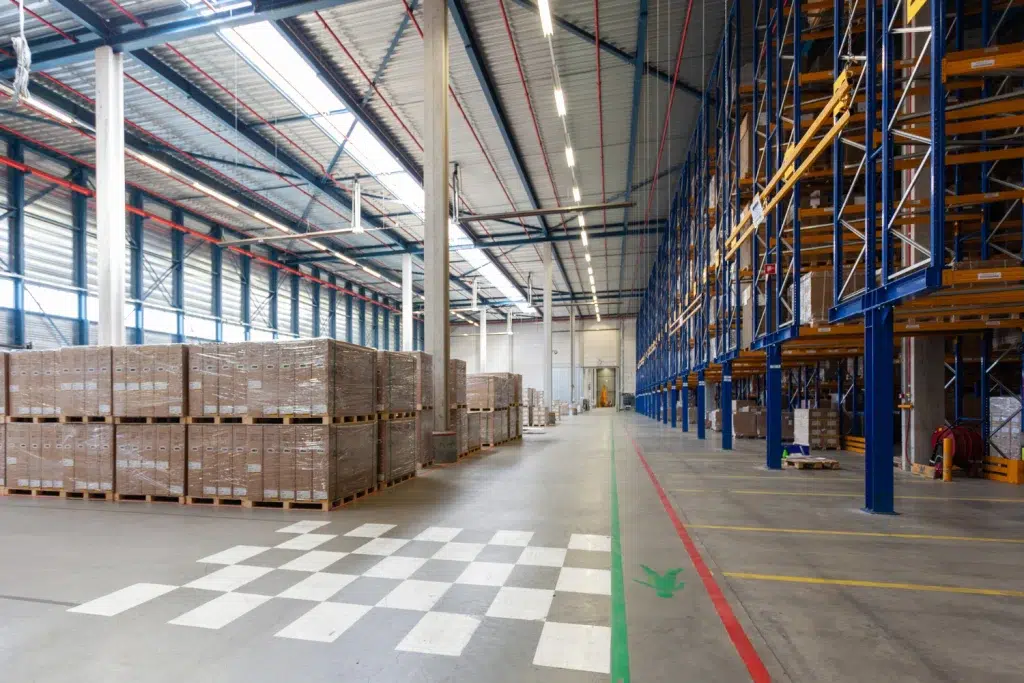
Warehouses are RF-hostile environments. They have long aisles, metal racks, moving equipment, and changing inventory. Therefore, WiFi coverage planning must start with layout reality.
Also, warehouses evolve. Racks move. Staging zones expand. New conveyors appear. As a result, a WiFi design must be flexible and easy to maintain.
Wireless Coverage Planning Starts With These Layout Questions
- Where do devices move? Forklift lanes, pick paths, cross-aisles, dock routes
- Where do devices stop? Packing benches, QA stations, shipping desks
- What blocks signal? Metal racks, concrete, freezers, machinery
- What changes seasonally? Inventory density, temporary racks, peak staffing
Corrective step: do a layout walk with operations before you design. If you skip this, you will optimize the wrong areas.
Warehouse Network Design and Wireless Coverage Planning: Map Workflows Before APs
Coverage is not the same as usability. A warehouse can have “signal everywhere” and still fail operationally. Therefore, start with workflows and device types.
Warehouse Layout WiFi Use Cases That Drive Requirements
- Barcode scanners: need stable roaming and fast re-authentication
- Voice picking: needs low latency and low jitter
- Forklift tablets: needs consistent coverage along travel lanes
- Shipping labels: needs reliable throughput at stations
- IoT sensors: needs stable connectivity and segmentation
Real-world technician scenario: “Laptop tests passed, scanners still dropped”
Technicians see this often. Laptops have stronger radios and different roaming behavior. The corrective step is to test with the real scanner models, at the same height and orientation, while moving at real speed.
Warehouse Layout WiFi and Aisle Direction: The “RF Corridor” Effect
Long aisles can act like RF hallways. Signal may travel farther than expected, which looks great in a quick test. However, cross-aisles and turns can create sudden shadows. Therefore, you must validate at turning points, not only mid-aisle.
Wireless Coverage Planning for Long Aisles (Avoid False Confidence)
- Signal can “shoot” down the aisle and hide weak cross-aisle coverage
- End caps can create abrupt SNR drops
- Reflections can increase retries even when RSSI looks strong
Corrective step: test at the aisle entrance, mid-aisle, and the turn. If the turn fails, adjust AP placement or add coverage to stabilize roaming.
Warehouse Network Design for Cross-Aisles and Roaming Stability
Cross-aisles are where roaming failures show up first. Also, they are where forklifts slow down and devices transmit more. As a result, these zones need intentional overlap and clean channel planning.
Corrective step: use consistent AP spacing along travel lanes. Oversized coverage cells often create co-channel interference and sticky clients.
Warehouse Layout WiFi and High-Bay Racking: Height, Metal, and Inventory Density
High-bay racks change everything. Metal reflects signal. Dense inventory absorbs it. Even worse, inventory changes over time. Therefore, you should plan for worst-case density, not empty racks.
Wireless Coverage Planning for Metal Racks and Liquid Inventory
- Metal racks: reflections cause multipath and retries
- Liquid products: absorb RF and reduce range
- Mixed pallets: create unpredictable shadowing
Corrective step: validate coverage when racks are full. If you can’t, simulate worst-case by testing behind the densest zones.
Warehouse Network Design: Test at Device Height, Not Head Height
Many surveys are done at chest height. However, scanners and forklift terminals operate at different heights. Therefore, test at the same height and orientation as the real devices.
Real-world technician scenario: “Coverage was fine until peak season”
This is common when the design was validated with low inventory. The corrective step is to plan for seasonal density and leave room for adding APs without redesigning the whole network.
Wireless Coverage Planning for Warehouse Materials: Concrete, Freezers, and Machinery
Warehouse layout is not only geometry. Materials matter. Concrete walls, freezer panels, and industrial equipment can block or distort signal. Therefore, you should treat special zones as separate design problems.
Warehouse Layout WiFi in Freezer and Cold Storage Zones
Cold storage areas often have insulated panels and tight doorways. Signal may not penetrate well. Also, hardware must survive the environment. The corrective step is to validate inside the cold zone and use equipment rated for temperature and condensation risk.
Warehouse Network Design Around Machinery and EMI
Conveyors, motors, and chargers can add noise. Therefore, test while equipment is running. The corrective step is to measure retries, SNR, and real throughput during production, not on a quiet day.
Common mistake: “We surveyed on a Sunday”
Weekend surveys can be misleading. The corrective step is to validate during real operations or simulate device load and movement.
Warehouse Network Design for AP Mounting: Ceiling vs Rack vs Pole
Mounting is not just “higher is better.” Height, angle, and placement relative to racks matter. Also, safety rules may limit mounting locations. Therefore, layout dictates what is realistic.
Warehouse Layout WiFi Mounting Tradeoffs
- Ceiling mounts: clean coverage, but can overshoot and increase co-channel interference
- Rack mounts: closer to devices, but inventory changes can block signal
- Pole mounts: flexible, but needs cable protection and impact planning
Corrective step: design for serviceability. If every AP requires a lift, maintenance becomes slow and expensive. Place APs where safe access is repeatable.
Real-world technician scenario: “APs were mounted perfectly, but nobody could service them”
Technicians sometimes inherit installs where APs are placed in hard-to-reach zones. The corrective step is to balance RF performance with maintenance reality, especially for high-traffic areas that cannot tolerate downtime.
Warehouse Layout WiFi and Roaming: Why Devices Drop at Turns and End Caps
Roaming failures are often layout failures. Turns, end caps, and dense inventory create sudden signal changes. Therefore, you need consistent overlap along travel lanes, not just “coverage everywhere.”
Wireless Coverage Planning for Predictable Roaming
- Keep AP spacing consistent along forklift routes
- Avoid oversized cells that create sticky clients
- Validate roaming with real scanners and tablets
- Watch retry rates and SNR at turning points
Corrective step: if devices drop at the same corner, test that exact spot during peak movement. Then adjust AP placement, power, or channel plan to stabilize handoffs.
Warehouse Network Design and TIA/EIA Standards: Cabling and Documentation That Support WiFi
Wireless coverage planning fails when the wired layer is ignored. TIA/EIA structured cabling practices emphasize labeling, documentation, and testability. That matters because many “WiFi issues” are really uplink, PoE, or cabling issues.
Warehouse Layout WiFi Cabling Error (TIA/EIA): IDF placement based on convenience
Technicians often find IDFs placed where there is space, not where they should be. That leads to long cable paths and messy runs. The corrective step is to plan IDFs around cable pathways, distance limits, and serviceability.
Wireless Coverage Planning Cabling Error (TIA/EIA): No labeling or port maps
Unlabeled drops slow troubleshooting. Therefore, outages last longer. The corrective step is to label both ends, maintain port maps, and keep diagrams updated after changes.
Corrective step: certify critical runs and validate PoE budgets
Bad terminations and weak PoE can cause AP reboots. The corrective step is to certify critical runs and confirm switch PoE headroom, especially in high-density zones.
Real-world technician scenario: “They replaced APs twice, but the uplink was bad”
This is common in warehouses. The corrective step is to check switch port errors, PoE stability, and cable test results before swapping hardware.
Wireless Coverage Planning Metrics for Warehouse Layout WiFi (Not Just RSSI)
RSSI is not enough. A warehouse can show strong signal and still perform poorly. Therefore, measure what predicts real stability and user experience.
Warehouse Network Design Metrics That Predict Performance
- SNR: usable signal quality
- Retry rate: interference, reflections, or poor channel plans
- Channel utilization: congestion during peak operations
- Throughput tests: real application performance
- Latency and jitter: critical for voice and real-time workflows
Corrective step: test during peak movement and shift change. That is when roaming and airtime problems show up.
Warehouse Layout WiFi Coverage Planning: A Step-by-Step Process That Works
A repeatable process makes WiFi predictable. Also, it makes it easier to explain decisions to leadership. Use this workflow to align layout, coverage goals, and cabling reality.
Warehouse Network Design Step 1: Start with an accurate floor plan
Confirm racks, docks, offices, and special zones. If the plan is outdated, the design will be wrong.
Wireless Coverage Planning Step 2: Identify high-density and high-risk zones
- Shipping and receiving
- Staging and packing
- Cross-aisles and turning points
- Freezers and thick-walled rooms
- Battery charging and machinery zones
Warehouse Layout WiFi Step 3: Place APs for roaming stability first
Coverage is step one. Roaming stability is step two. Therefore, design overlap along travel lanes and validate handoffs with real devices.
Warehouse Network Design Step 4: Align cabling paths early (TIA/EIA mindset)
Do not “figure out cabling later.” The corrective step is to plan cable routes, conduit, and IDF placement early so AP locations are buildable and maintainable.
Wireless Coverage Planning Step 5: Validate, tune, and document
Validate during production hours. Then tune channels and power. Finally, document AP locations, switch ports, and settings so future changes are controlled.
Conclusion: Warehouse Layout WiFi Planning Makes Coverage Predictable
Warehouse layout WiFi success comes from respecting the building and the workflow. When you align wireless coverage planning with warehouse network design, you reduce dead zones, roaming failures, and expensive rework. Most importantly, you build a network that holds up during peak operations, not only during a quiet test.
Schedule Your Free Warehouse WiFi Site Survey
Contact UniFi Nerds for a practical warehouse layout WiFi review and comprehensive network assessment. We’re available 24/7.
Call: 833-469-6373 or 516-606-3774 | Text: 516-606-3774 or 772-200-2600
Email: hello@unifinerds.com | Visit: unifinerds.com
Free consultations • Phased implementation • Budget-friendly • Warehouse-ready design • 24/7 support